
Risk Analytics
VaR Calculator
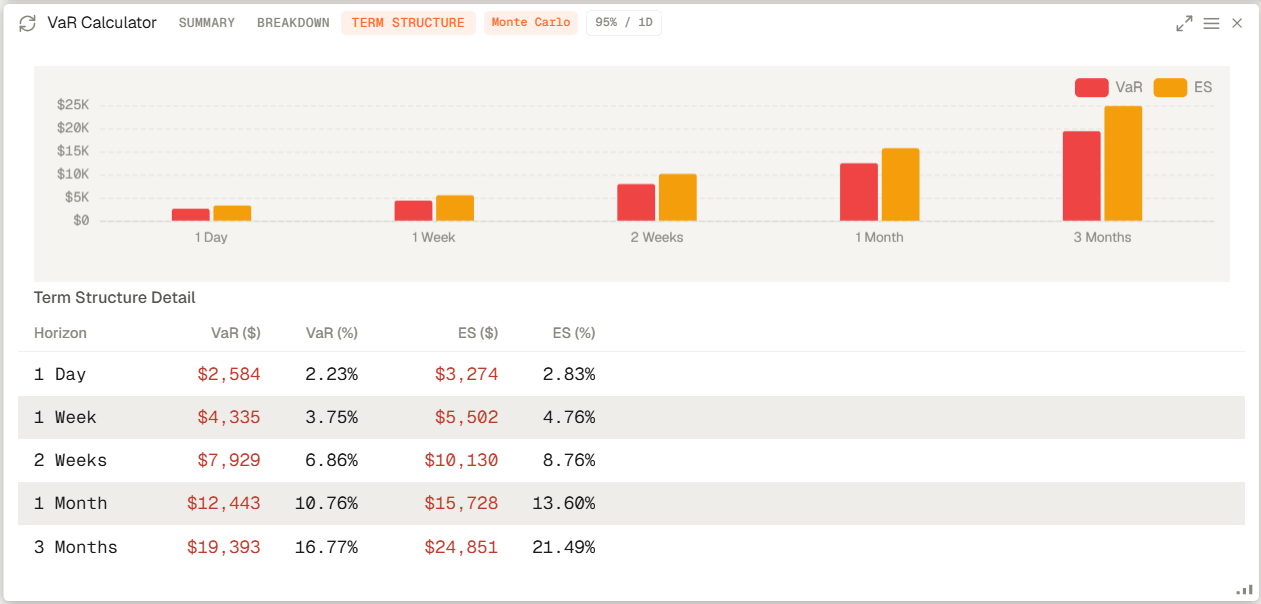
VaR Calculator shows your portfolio Value at Risk (VaR) and Expected Shortfall (CVaR) using historical, parametric, and Monte Carlo methods. It is most useful when paired with factor and attribution widgets so the user sees both the risk number and the reason behind it.
VaR Calculator shows your portfolio Value at Risk (VaR) and Expected Shortfall (CVaR) using historical, parametric, and Monte Carlo methods. It is most useful when paired with factor and attribution widgets so the user sees both the risk number and the reason behind it.
How to access and configure
- Open your workspace and add the Var Calculator widget from the widget catalogue (Add widget on the top right).
- Open the widget settings to choose or change the portfolio, VaR method, confidence level, and horizon you want to calculate.
- In the widget you will see the breakdown of the VaR calculation, the structure detail and you will be able to compare the results of the different VaR methods.
Related topics
- Widget
- VaR
- Monte Carlo